Configuration Compliance
The entire intent or expected configuration that is defined for a given switch is stored in Cisco NDFC. When you want to push this configuration down to one or more switches, the Configuration Compliance module is triggered. Configuration Compliance takes the current intent, the current running configuration, and determines the set of configurations required to change the switches from the current running configuration to the expected configuration so that everything will be In-Sync.
With Configuration Compliance, the sync is always from Cisco NDFC to the switches. There is no reverse sync. So, if you make a change out-of-band (OOB) on the switches that conflicts with the defined intent in Cisco NDFC, Configuration Compliance captures this diff, and indicates the device status is Out-of-Sync. The pending diffs will undo the OOB configurations to return the device to In-Sync status. Note that such conflicts due to OOB changes are captured by the periodic Configuration Compliance, which runs every 60 minutes by default or when you click the RESYNC option either on a per-fabric or per-switch basis. From Cisco NDFC Release 12.1.1e, the periodic Configuration Compliance runs every 24 hours. You can configure the custom interval with the range of 30–3,600 minutes.
To improve the ease of use and readability of deployed configurations, Configuration Compliance in Cisco NDFC is enhanced with the following:
All displayed configurations in Cisco NDFC are easily readable and understandable.
Repeated configuration snippets are not displayed.
Pending configurations precisely show only the diff configuration.
Side-by-side diffs have greater readability, integrated search or copy, and diff summary functions.
Any configurations showing in the Pending Config window are highlighted in red in the Side-by-side Comparison window if the configurations are seen in the Running Config window but not in the Expected Config window. Also, any configurations showing in the Pending Config window are highlighted in green in the Side-by-side Comparison window if the configurations are seen in the Expected Config window but not in the Running Config window. If there are no configurations displayed in the Pending Config window, no configurations are shown in red in the Side-by-side Comparison window.
The following figure shows how Cisco NDFC displays the Out-of-Sync status.
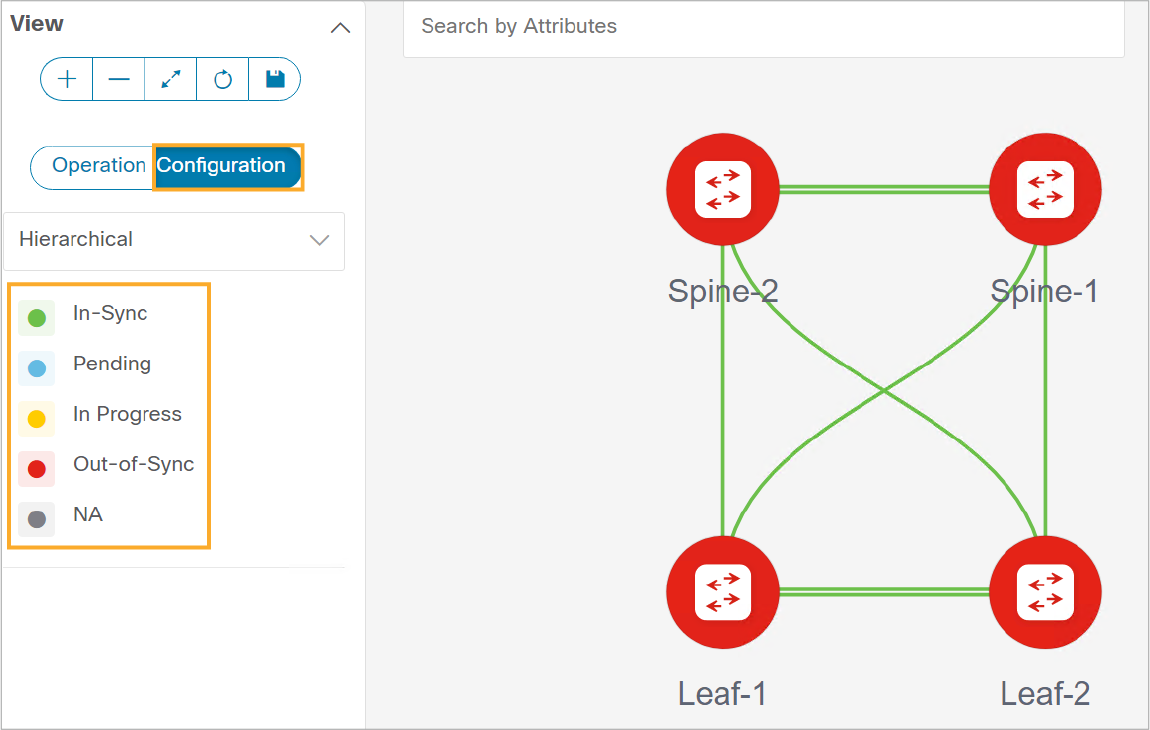
The configurational colors and what they indicate are described in the following list:
Green: Indicates that the element is In-Sync with the intended configuration.
Blue: Indicates that the element has pending deployments.
Yellow: Indicates that active deployments are in progress.
Red: Indicates that the element is Out-of-Sync with the intended configuration.
Gray: Indicates a lack of information or no support for the Configuration Sync calculation.
Configuration validation is an integral task that any network controller requires. The controller must correctly push your intended configurations to the respective switches. Configurations should always remain In-Sync and in compliance with the expressed intent. This approach, which recognizes, reports, and remediates any deviation from the intended configuration, is referred to as “closed loop.” In the Cisco NDFC Fabric Controller mode, Configuration Compliance supports this closed-loop method with Data Center VXLAN EVPN fabrics and traditionally built networks within an external fabric.
Configuration Compliance embeds and integrates within Cisco NDFC, where it evaluates underlay, overlay, and interface configurations, and other configurations that you drive through Cisco NDFC policies. You can build a fabric intent if you customize fabric setting options and templates.